
Plan mode and custom agents
Plan-then-confirm for multi-step work, plus sub-agents and your own agent definitions.
For multi-step work the main agent does not need to do everything itself. Plan mode forces a confirmation step before any tool runs, and sub-agents let the main agent delegate narrow chunks to specialized prompts.
Plan mode
Toggle plan mode in the composer. When on, the agent's first job is to produce a plan: the steps it intends to take, in order, with file paths and approximate scope. Nothing is written until you confirm.
After confirmation the plan executes step by step. If a step needs an approval-gated tool you still see the per-tool approval card.
Use it when:
- The task touches 3+ files.
- You want to read the agent's reasoning before it spends time.
- You want a checkpoint before destructive operations.
Sub-agents
The main agent can call run_subagent to delegate a chunk of work to a sub-agent with a narrower prompt and a tool subset. Sub-agents are defined in agents/registry.ts and run through runSubagent.ts.
Typical use: a "code reviewer" sub-agent that only has read_file / fs_grep, or a "refactor" sub-agent restricted to a single directory. Sub-agents report back to the parent agent on completion - the parent decides what to do with the result.
Custom agents
Define your own agents in Settings -> Agents. Each agent has:
- Its own system prompt.
- Its own tool subset (you can grant any subset of the composer tools).
- An icon and color for the agent picker.
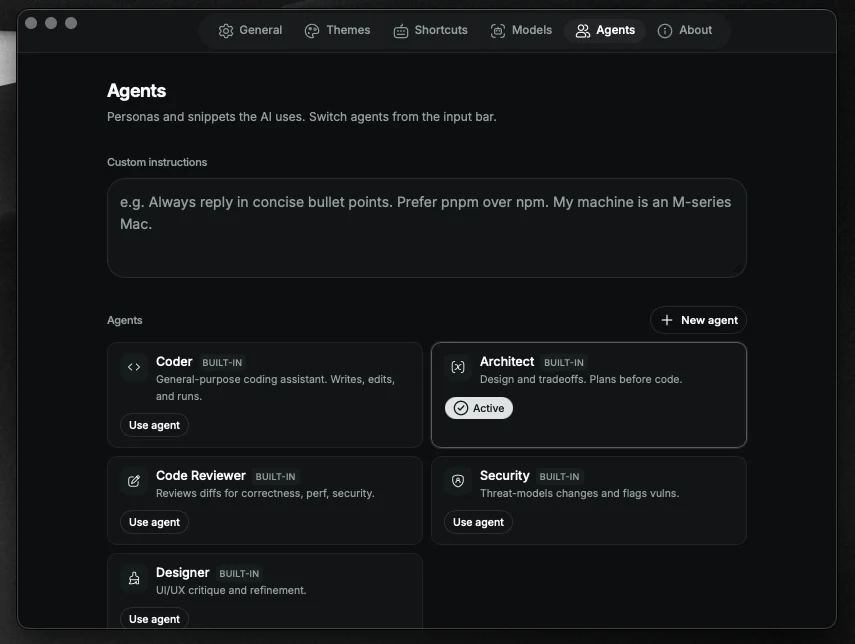
Custom agents are stored in terax-ai-agents.json in the app data directory.
Switch the active agent from the composer's agent picker. Each chat session remembers which agent was active when it was created.
When plan mode vs sub-agents
- Plan mode is about you approving a plan before anything runs.
- Sub-agents are about the main agent breaking work into focused chunks.
They compose. Plan mode lists the sub-agent invocations as steps; you can reject a step before it spawns.