
Install and first run
Install Terax on macOS, Linux, or Windows, then connect your first AI provider.
Terax ships as a signed desktop bundle. Download the installer for your platform from the Releases page. Terax auto-updates from there.
macOS
Two separate .dmg builds - one for Apple Silicon (aarch64), one for Intel (x86_64). Pick the one that matches your hardware on the Releases page, drag Terax to /Applications, and launch.
Linux
- Arch / AUR:
yay -S terax-bin(orparu, etc.). Tracks the latest release. - Debian / Ubuntu: install the
.debfrom Releases. Depends onlibwebkit2gtk-4.1-0andlibgtk-3-0. - Fedora / RHEL: install the
.rpm. Depends onwebkit2gtk4.1andgtk3. - AppImage: needs FUSE. If FUSE is missing, run
./Terax_*.AppImage --appimage-extract-and-run. - On Wayland with rendering glitches, set
WEBKIT_DISABLE_DMABUF_RENDERER=1. The.deb/.rpmpackages link against the system GTK stack and tend to be smoother than the AppImage.
Windows
NSIS installer in currentUser mode (no admin required). WebView2 is bootstrapped offline.
On first launch Windows may show "Windows protected your PC" because Terax is not code-signed yet. Click More info then Run anyway.
Default shell detection on Windows: pwsh.exe (PowerShell 7+) -> powershell.exe (Windows PowerShell 5.1) -> cmd.exe. WSL distros are first-class workspaces, not a wrapped subprocess. See Workspaces.
Connect your first AI provider
Terax is BYOK. Pick any supported provider and paste your key in Settings.
- Open Settings -> Models (
Cmd+,then choose Models, or click the gear in the sidebar). - Pick a provider (OpenAI, Anthropic, Google, Groq, xAI, Cerebras, OpenRouter, DeepSeek, Mistral, or any OpenAI-compatible endpoint).
- Paste your API key.
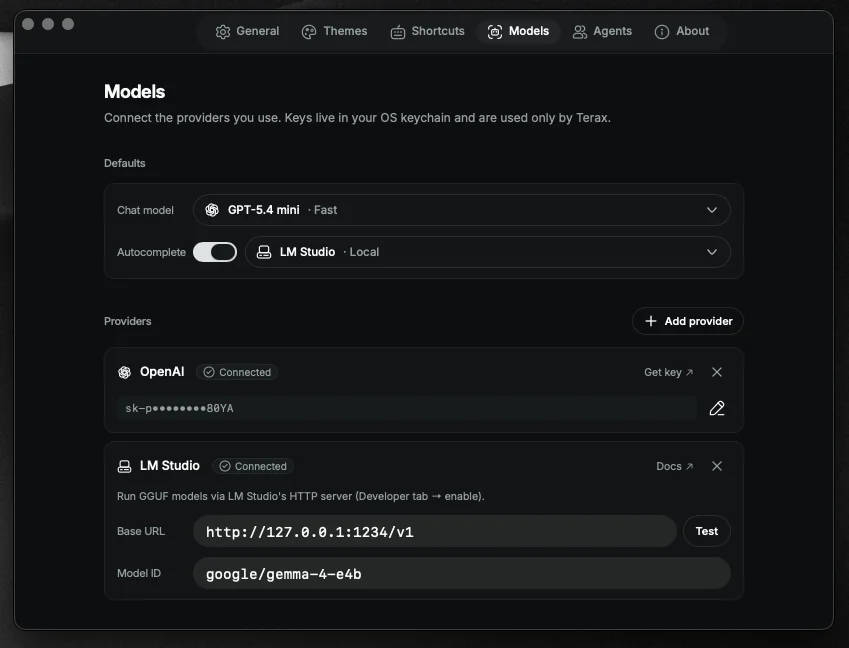
Keys are written to the OS keychain via the keyring crate (service terax-ai). They never touch disk, localStorage, or the settings file.
Local and offline
You can run entirely offline against LM Studio, MLX, or Ollama. Point Terax at the endpoint URL in Settings -> Models. No key required, just a model id at runtime.
Build from source
Prerequisites: Rust (stable), Node 20+, pnpm, and the Tauri prerequisites for your platform.
pnpm install
pnpm tauri dev          # development
pnpm tauri build        # production bundle
Next
Tour the workspace in Workspace layout, or jump to any feature.